Built a TCP Load Balancer in C to understand how it actually works.
A lot of engineers use load balancers every day. But most of them never go deep enough to understand how it works. I did, and I implemented a Layer 4 load balancer in C to understand how it works. It is not a production-grade solution but is enough to give a core conceptual idea of modern load balancers.
Why I built it?
I'm a great fan of a quote by Nobel Prize-winning physicist Richard Feynman, and it goes like this: "If I can't build it, I don't understand it. "That's why I try to build anything I find interesting.
What a Load Balancer is?
I'll put it in simple words. You hosted a website on a server. That server can handle 10K users at any give time. In the future, your website traffic will grow, and more than 10K users will start visiting your website. Now you need to handle more traffic. You have 2 options.
- Increase server resources (vertical scaling).
- Add one more server to the system (horizontal scaling).
You decided to go with the 2nd approach and added 1 more server to your system. But now your users do not know which server to connect to since you have 2 servers doing the same thing. A load balancer is a system component that will be placed in front of these 2 servers. Clients will connect to the load balancer, and the load balancer will connect to any one of the backend servers and bring back a response to the client. Load balancers have several algorithms to decide which server to connect to. You can read about those algorithms here.
Just for a visual demonstration, below is a diagram.
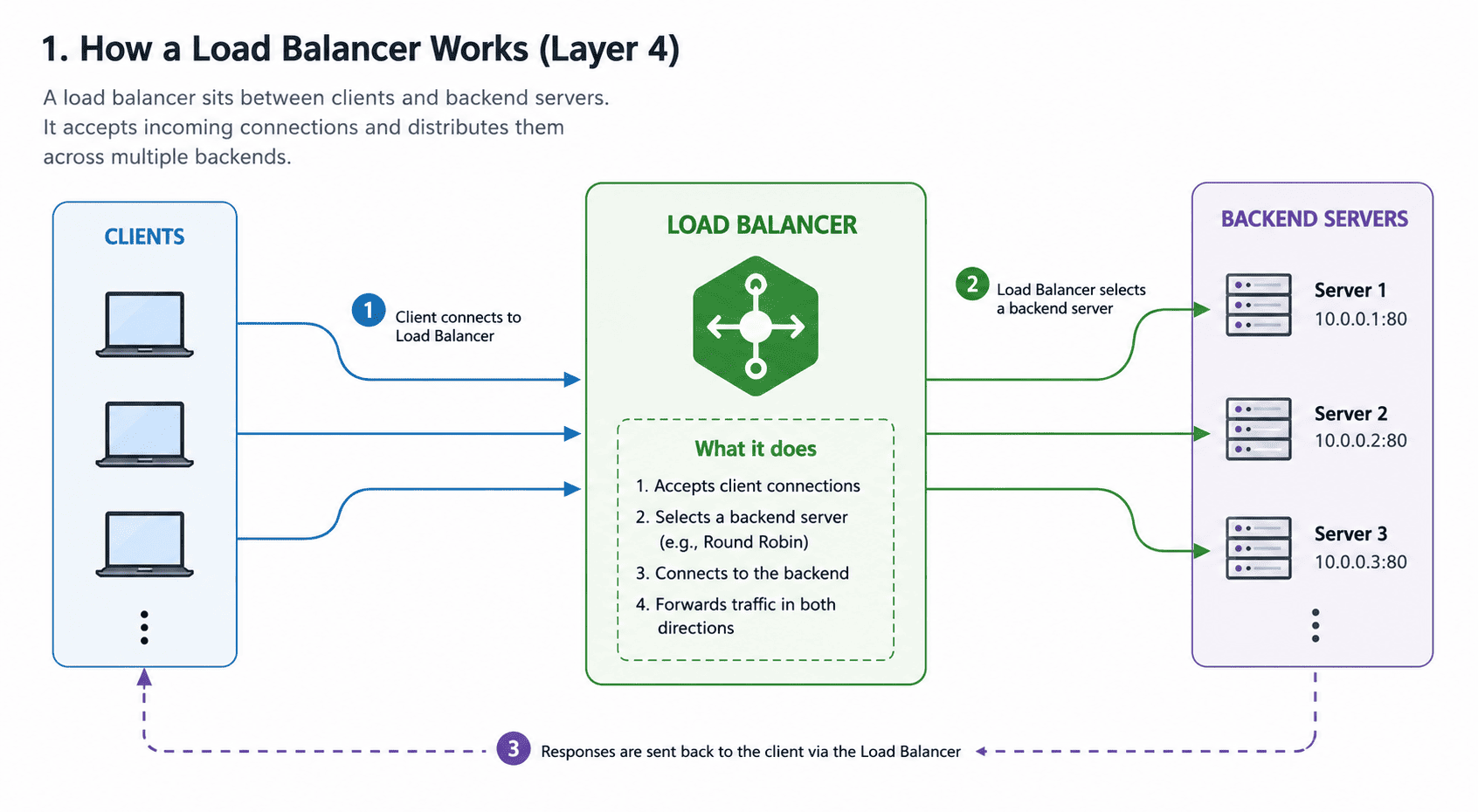
2 types of Load Balancers
- Layer 4 - Works on TCP Layer.
- Layer 7 - Works on HTTP / Application Layer.
I implemented a Layer 4 load balancer to keep things simple and work on direct TCP instead of diving into HTTP complexities.
The Simplest Possible Architecture
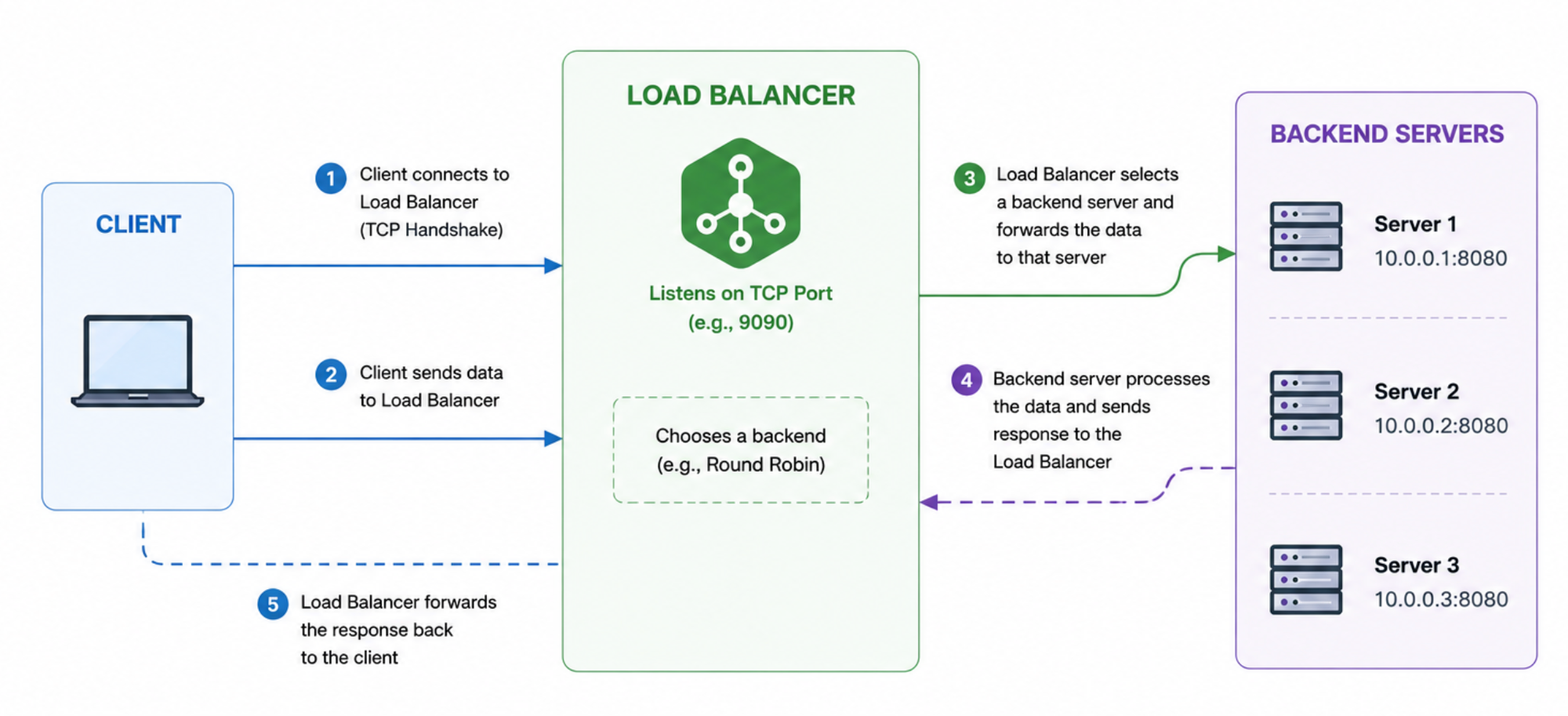
A load balancer has 4 simple responsibilities:
- Accept client connections
- Select a backend server
- Connect to that backend
- Forward traffic in both directions
So architecture would be simple. A load balancer listens for client connections on a TCP port. Once a client sends some data, it will pick any one of the backend servers and send data received by the client to the server. When the server responds to the load balancer, the response will be sent to the client.
But how to handle multiple requests?
As far as this architecture is concerned, it is single-threaded, and only 1 request can be served at any time. This will not scale, as other requests will need to wait until the previous request completes. But modern applications need to handle thousands of requests per second.
The Threaded Approach
Most people will come with a multi-threading approach. They will simply spawn a new thread every time a request comes to the load balancer. But this is very dangerous for scaling. Threads are not lightweight in nature. They will overload your system memory and waste CPU time in context switching. All of this headache just for a request that might take a few milliseconds to seconds and doing it again for a new request. There is a CS problem on this exact same concept known as the C10K problem. This problem deals with how a web server can handle 10,000 clients simultaneously without crashing. So we won't be able to use the thread-pre-request model in our load balancer.
But why there is problem with threads?
For those who are not very familiar with operating systems, here is a simple explanation of why the thread-per-request approach fails.
Let's say you built your load balancer in Java with a thread-per-request approach. You are creating a thread for every request that comes to your load balancer. In Java when a thread is created, it is allocated a stack size of 1 MB. In simple terms, 1MB from computer memory is given to that thread for its execution. What if your load balancer gets 10,000 requests at the same time? You will create 10,000 threads, and those will need 10,000 MB of memory, which is equal to 10 GB. RAM is expensive, and you can't just keep upgrading it.
But there is one more problem. A typical request lifecycle will look like this. Client Connected -> Thread Created -> Load Balancer goes to server -> Server process request -> Server return response -> Load Balancer return response to client. In the time when the server was processing the request, your load balancer thread was sitting idle and not doing anything. This is a waste of your CPU time.
Event Driven Approach
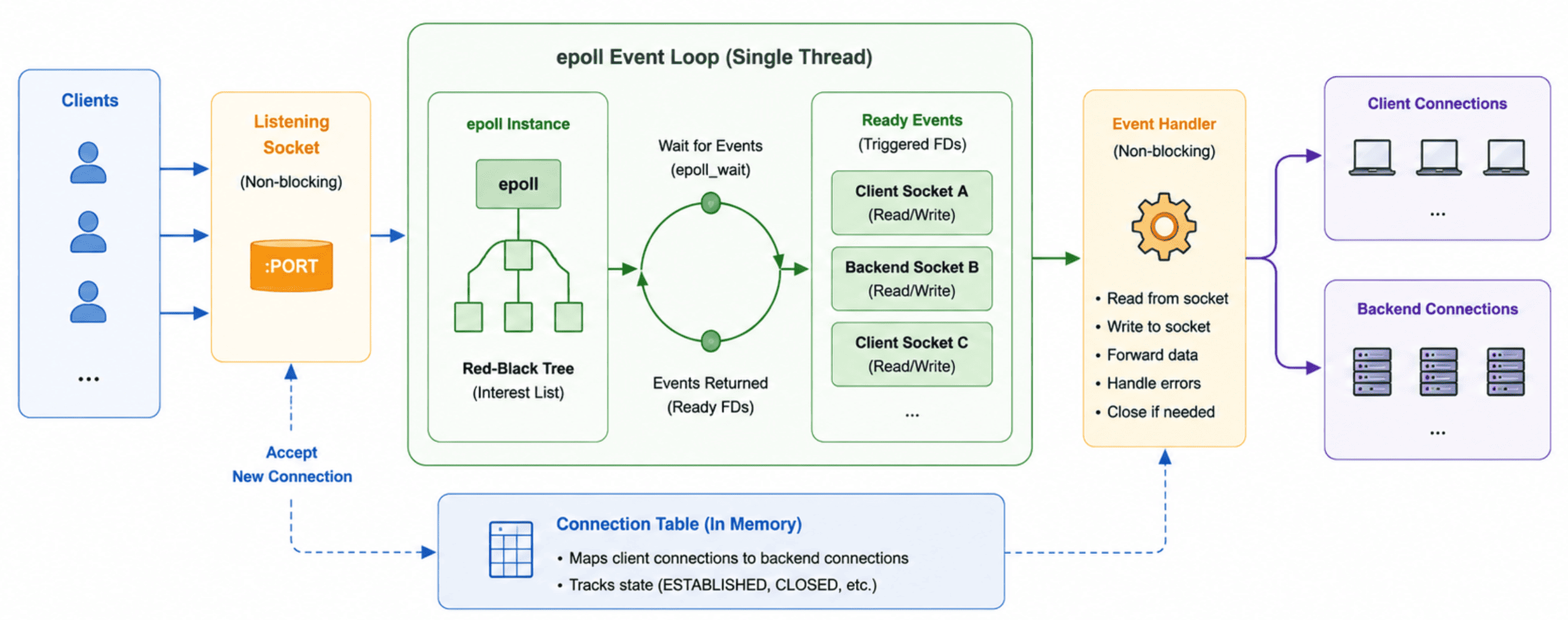
We have a better approach. Instead of creating a thread for every request, modern load balancers use an event driven architecture. The idea is surprisingly simple. Rather than asking operating system to create 10,000 threads, we ask operating system to tell us whenever something interesting happens on a socket. Linux provides a mechanism called epoll for exactly this purpose.
Think of it like this. Instead of hiring 10,000 employees and assigning one employee to each customer, you hire a single receptionist. Customers come and go throughout the day. Most of the time they are waiting for something. The receptionist simply keeps track of who needs attention right now and only talks to those people. That is exactly what epoll does.
A load balancer may have thousands of client and server connections open at the same time. Most of these connections are idle and waiting for data. Instead of continuously checking every connection, the load balancer goes to epoll and asks:
"Which connections are ready right now?"
The operating system returns only the connections that have something interesting happening on them, such as:
- New client connection arrived
- Client sent data
- Backend server sent response
- Connection closed
The load balancer then processes only those sockets and immediately goes back to waiting for more events. A typical flow now looks like this:
Client Connected → epoll notifies load balancer → Load Balancer accepts connection
Client Sent Data → epoll notifies load balancer → Load Balancer forwards data to backend
Backend Sent Response → epoll notifies load balancer → Load Balancer forwards response to client
Notice something important here. While the backend server is processing a request, the load balancer is not blocked. It is free to handle thousands of other connections. There is no dedicated thread sitting idle waiting for a response. This solves both problems we discussed earlier.
Memory Usage Drops
With thread-per-request model, 10,000 requests could mean 10,000 threads and several gigabytes of memory consumed by thread stacks. With epoll, a single thread can manage thousands or even hundreds of thousands of connections. Memory consumption becomes proportional to connection metadata instead of thread stacks.
Less Context Switching
Operating systems constantly switch between runnable threads. This operation is called a context switch and it is not free. CPU registers must be saved and restored every time the scheduler moves between threads. When thousands of threads exist, the CPU spends a significant amount of time performing context switches instead of doing useful work.
An event driven load balancer typically runs with only a few threads. This dramatically reduces context switching overhead and allows the CPU to spend more time forwarding traffic. This is the reason why high-performance systems such as NGINX, HAProxy and many modern proxies rely heavily on event driven architectures instead of spawning a thread for every connection.
Implementation
I've implemented the same idea from scratch in C. But instead of using epoll I've used kqueue because epoll is only available on Linux and I'm on Mac which supports kqueue but the idea is same.
You can find source code on GitHub
You May Also Read
- Understanding gRPC architecture in simple terms
- Kafka Fundamentals - Guide to Distributed Messaging
- Understanding RabbitMQ in simple terms
Before You Go
I usually write about backend engineering, distributed systems, and things I learn while working on real problems. Not theory — mostly practical stuff that I wish someone had explained to me earlier.
I run a free newsletter where I share these kinds of write-ups. No spam. Just occasional backend engineering notes.