How Search Engines finds your website - Web Crawlers?
This is the 2nd episode of my series Behind The Screen, where I’m discussing the workings of tech that enhance our daily life in the simplest way.
Here are the other episodes of this series in case if you find something interesting.
Web crawlers are software that only a few people know about, but they play a major role in today’s tech. Without web crawlers, our search engines will not be able to show us search results. In this post we will discuss how web crawlers work by learning the core idea behind them.
I’m not tying this article to any specific implementation of a web crawler, as different minds can come up with different implementations, but result will be the same. So we will discuss the core concept of web crawlers instead of how Google, Yahoo or any other search engine crawl internet.
What is a Web Crawler?
A web crawler, sometimes called a bot or a spider, is software that automatically and systematically browses the internet, downloads and indexes content from websites and builds a database that can be used by search engines to show search results to users.
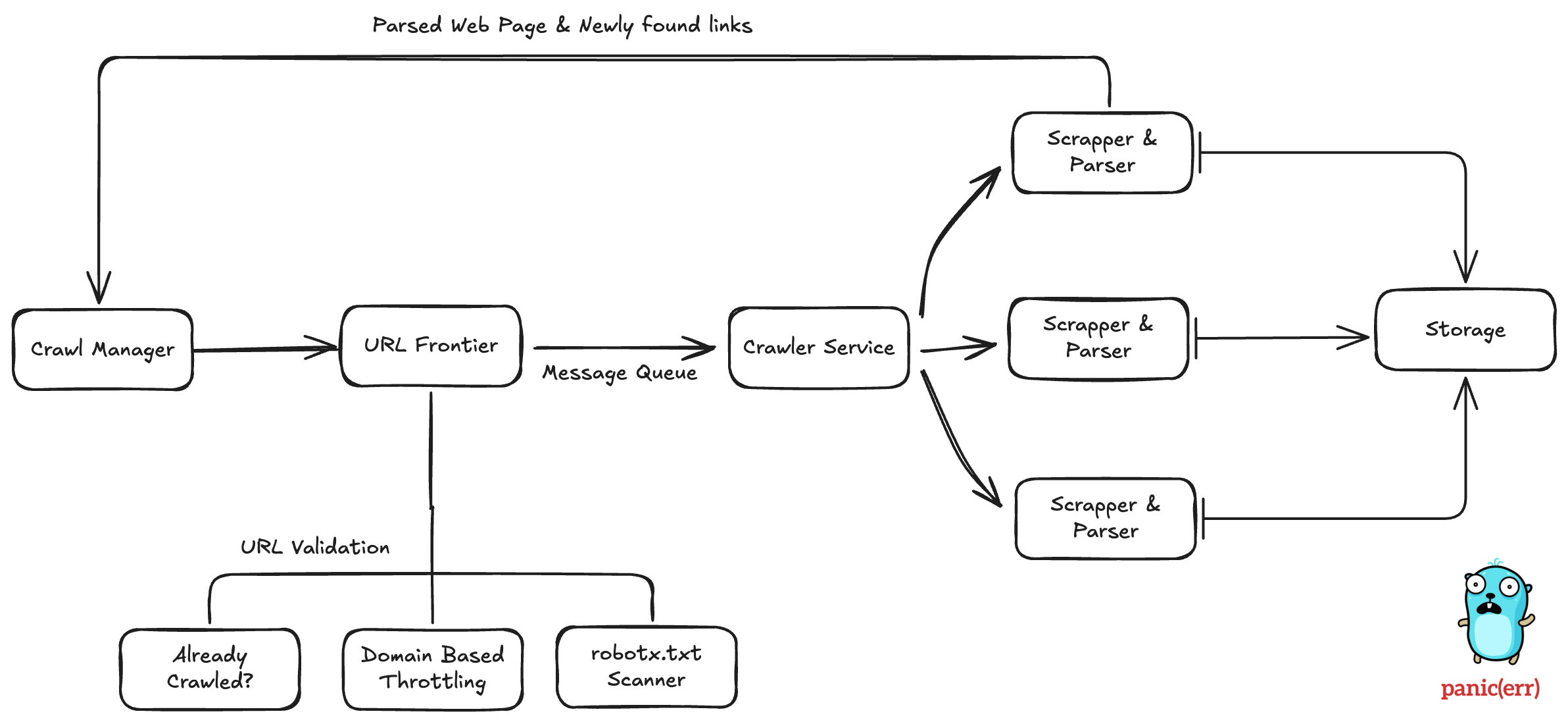
So a web crawler simply had to do the following things:
- Verify the link before crawling.
- Download HTML for the page.
- Parse the HTML and extract meaningful information.
- Store this data in a database.
These things are handled by different components. Each one performs its task and sends the result to the next step. Let’s understand each component.
Crawl Manager
It is a parent entity for the whole crawling system. We go to the crawl manager and say, “Hey! This is the link: sushantdhiman.substack.com. Please crawl this.” and Crawl Manager will start the process by giving this link to URL Frontier.
URL Frontier
Before actually starting the crawling, we first need to validate the link. URL Frontier answers the question “Should we even process this link?” But first What can be scenarios where we will not process a link? Here are a few of them:
- The URL is already processed.
- The URL is blacklisted by our crawler.
- We have rate-limited specific websites to prevent abuse.
- The website does not want us to process this URL via robots.txt.
You read the last point correctly. Yes! The website can tell a web crawler that it doesn’t have to crawl the following links. But how? By creating a robots.txt file in the root of the website.
For example check this
https://sushantdhiman.substack.com/robots.txt
User-agent: BLEXBot
Disallow: /

User-agent: Twitterbot
Disallow:


User-agent: *
Disallow: /action/
Disallow: /publish
Disallow: /sign-in
Disallow: /channel-frame
Disallow: /session-attribution-frame
Disallow: /visited-surface-frame
Disallow: /feed/private
Disallow: /feed/podcast/*/private/*.rss
Disallow: /subscribe
Disallow: /lovestack/*
Disallow: /p/*/comment/*
Disallow: /inbox/post/*
Disallow: /notes/post/*
Disallow: /embed
Links mentioned with “Disallow” should not be crawled. But again, it’s not a protective shield; it’s just an indication for web crawlers, and every web crawler should respect the robots.txt file.
How to check if a link is already crawled?
For this web crawler uses a Bloom filter, which is a space-efficient probabilistic data structure. It is the same thing which is used by search engines to tell if a username is available or not.
But why this? Why not a DB query?
It’s simple. Querying a database with trillions of links to check if 1 link is present or not makes no sense, as it will take a lot of time and computing cost.
Crawling Actually Start
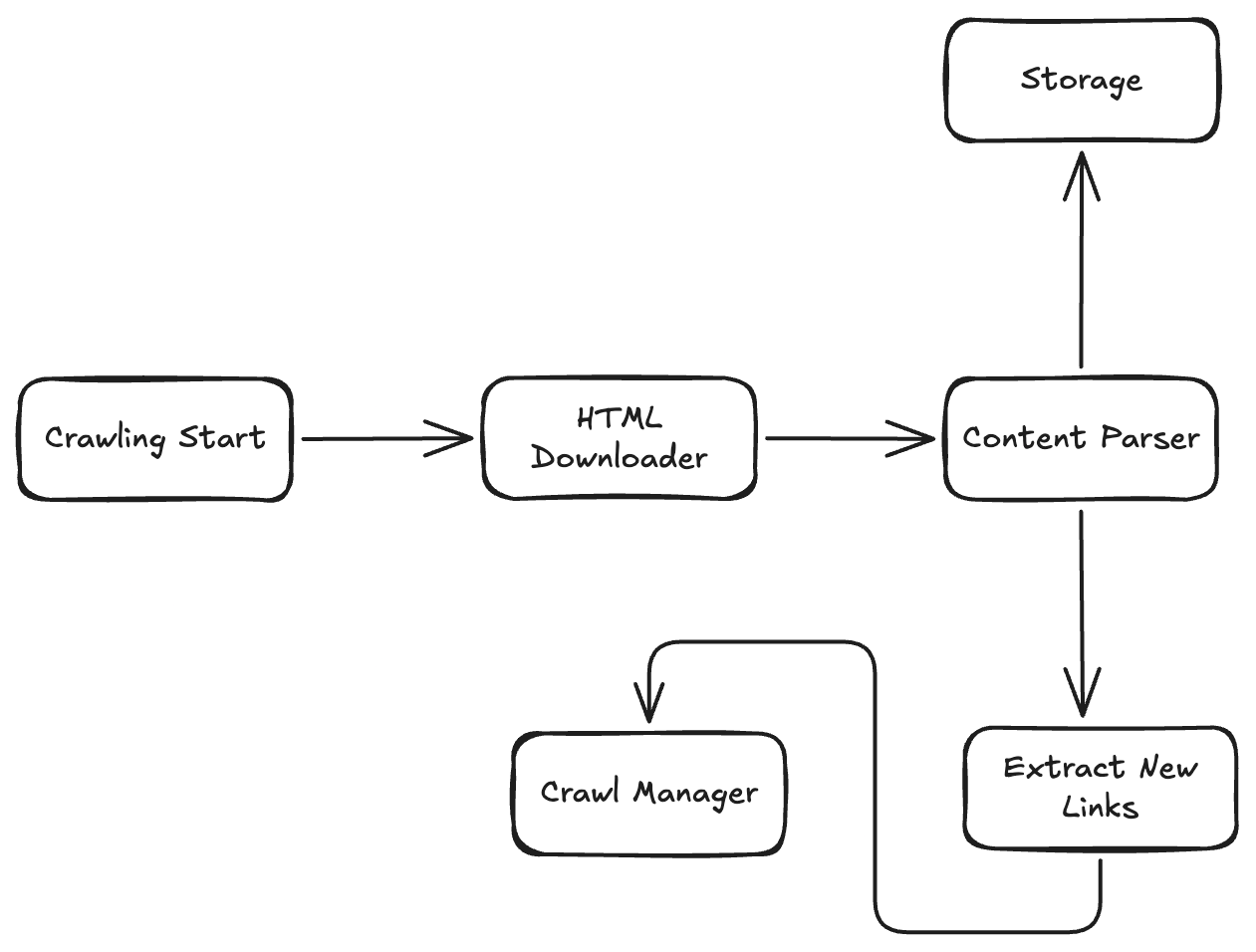
At this point we have verified the URL, and it is actually ready for crawling. It will be sent to HTML Downloader first.
HTML Downloader
As it’s name suggest this component is responsible for downloading HTML for the link. This is not a highly complicated component. For basic functionality you will need to do a HTTP Get call to the link and save response in HTML file.
I’m building an Open Source Integration Engine to make SaaS integrations easy.
You can check it: Connective
Open source contributions are also welcome in this project.
Content Parser
This is where magic happens. This component parses the downloaded HTML page and extracts meaningful information. This information includes:
- Title
- Meta Data
- Description & Text Content
- Other Links
But what is HTML Parsing?
It is the process of analysing raw HTML and converting it into a structured data structure.
How does HTML Parsing Work?
Look at this HTML page
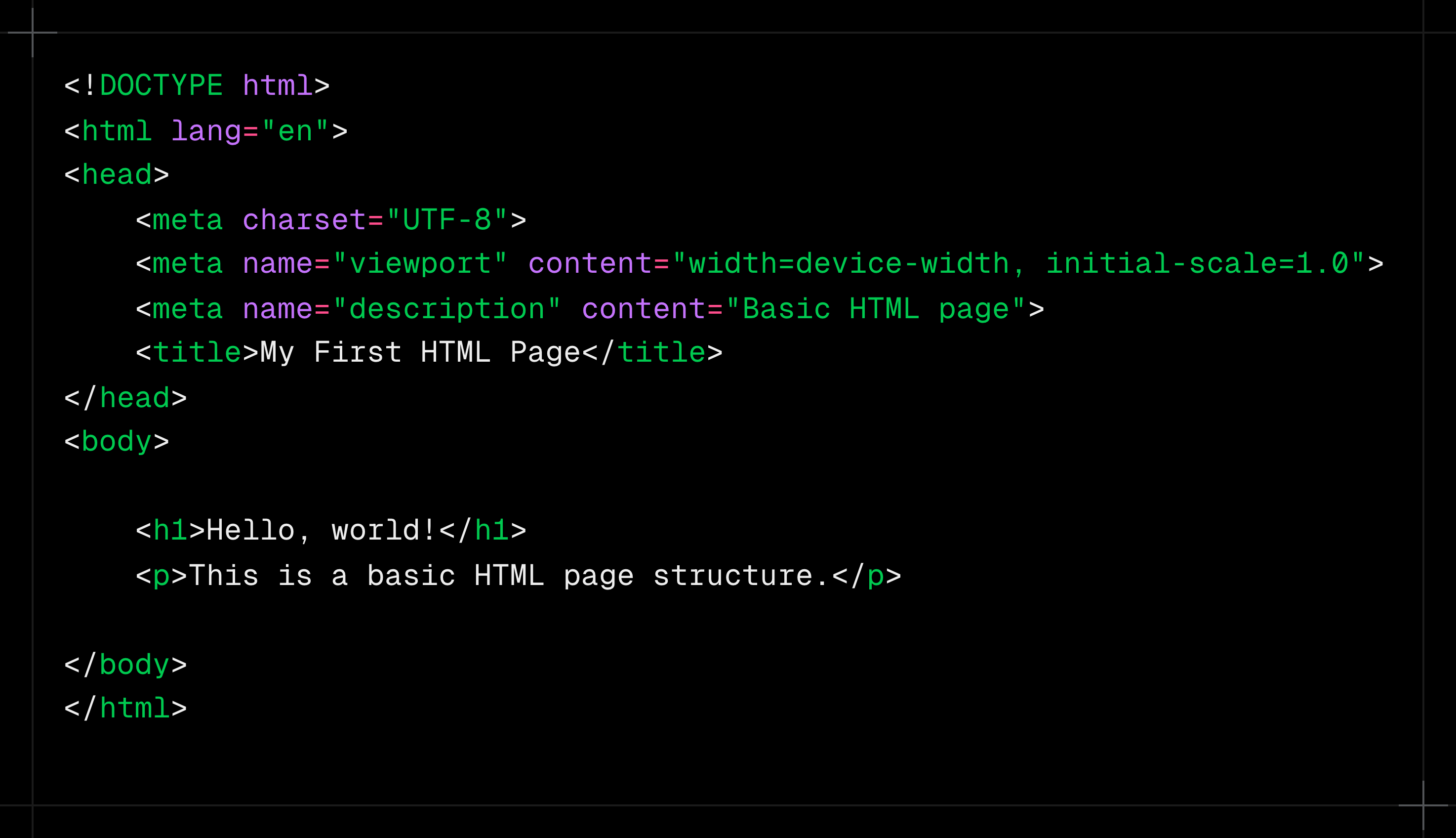
HTML code can be represented as a tree where “html” is the base top node and “head” and “body” are child nodes. Later, head and body also have several child nodes. So we can traverse node by node and get the data we want.
Of course we are not going to write this traverse logic ourselves; we will use some pre-existing libraries for it, such as “html” in Golang.
💡 Quick note: If you enjoy understanding how everyday tech actually works under the hood, I write one of these breakdowns every week in Behind The Screen. You can subscribe below — no spam, just deep system-level explanations.
Duplicate Content Prevention
Highly advance web crawlers also have this component that is responsible for checking if the content is duplicate. Different links can have same content so this content will tell crawler to skip these pages.
Content Storage
Now we have downloaded the html, parsed it into useable data structure and checked it against duplicacy. It’s time to store it in a database. This is the end of crawling process.
Can database store trillions of data objects?
Yes! but not a single database (in most cases). But instead, distributed databases with thousands of nodes are required by large web crawlers.
Which database is used by these giant search engines?
I don’t work in big tech, but I can answer this question based on data available publicly.
Google - Google File System / Colossus
Bing - ObjectStore + RocksDB
New Links
We discovered some new links while parsing an HTML page. We can send these links to Crawl Manager to start crawling on these new links. This will become a Breadth First Search-based web crawler.
- Crawl one page at the start.
- Get more links from that page.
- Schedule those links for crawling.
- When those links are crawled, new links are discovered.
- Repeat.
Don’t crawling billions of links take a lot of time?
Billions of links are created daily on the internet. This led to the question of time. See you read this article as a crawling journey of a single link. In the actual system, highly powerful computers are used.
Also, web crawlers are distributed in nature. That means there is not a single deployment of a web crawler; instead, there are thousands of deployments of web crawlers that work together.
A Simple Web Crawler
I’ve built a simple web crawler for my final year project. You can find it on GitHub